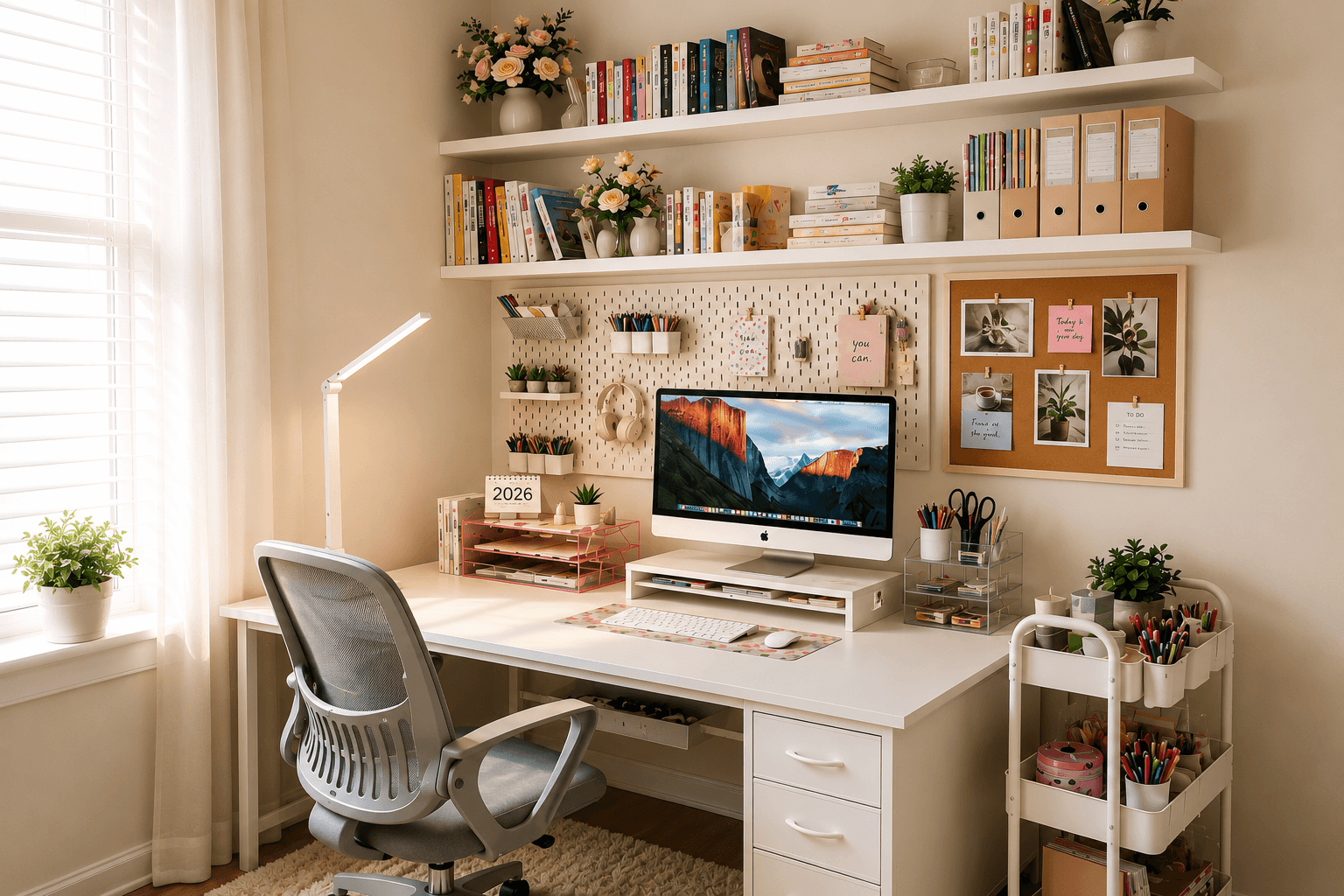
7 Space-Saving Products That Fixed My Small Desk Setup
Disclosure
This post may contain affiliate links. If you purchase through these links, I may earn a small commission at no extra cost to you. As an Amazon Associate I earn from qualifying purchases.
A small desk has a way of becoming unusable very quickly. You start with the monitor, add a lamp, set down a notebook, a mug, and before long every inch of surface is competing for the same limited space. The keyboard gets pushed to the edge, books and papers pile up beside the monitor, and the tangle of cables underneath somehow makes everything feel messier than it actually is.
What changed my setup wasn’t buying a bigger desk. Instead, I stopped expecting the desktop to hold everything.
The biggest change came from giving different categories of items needed their own dedicated zones and then finding products that created those zones without consuming more of the desk itself. Some of that storage went onto the wall. Some went above the monitor. Some went beside the desk entirely.
Once each item had a place that made sense, the desk stayed clear on its own. Not because I’d gotten better at tidying, but because the system made tidying the natural default.
Here’s what my desk looked like before:
- Pens and stationery scattered across the surface
- Headphones and charging cables with nowhere to go
- Books stacked beside the monitor
- Sticky notes covering every available corner
- Power stripes and cable creating constant visual clutter
These are the seven products solved each of those problems one by one. I didn’t buy them all at once, but together they completely changed how my small desk functions.
Quick Setup Overview
Before getting into each product, here’s how they fit together at a glance.
| Product | Solves This Problem | Best For |
| Keepo Pegboard | Wall clutter & surface overflow | Supplies & accessories |
| OPNICE Monitor Stand | Wasted space beneath the monitor | Monitor & laptop users |
| YASONIC Rolling Cart | Overflow that doesn’t belong on the desk | Books & larger supplies |
| Gianotter Desk Organizer | Everyday stationery clutter | Pens &office supplies |
| White Crown Desk Lamp | Poor lighting & phone charging | Studying & focused work |
| BAYKA Floating Shelf | Lack of vertical storage | Books, decor & plants |
| U Brands Cork Board | Sticky notes everywhere | Planning & reminders |
| Cinati Cable Tray (Bonus) | Cable clutter under the desk | Power strips & chargers |
Why This Setup Works
The instinct when a desk gets cluttered is to add more storage to the desk itself. Another tray, another organizer, another drawer unit sitting right there on the surface. The problem is that every organizer you place on the desk takes up the exact space you’re trying to clear.
This setup works differently. Instead of adding to the desk, it moves storage away from it: onto the wall, above the monitor, up to a floating shelf, beside the desk on a rolling cart, and underneath it for cables.
The desk surface becomes the one place that stays clear, because every other category has already been given somewhere better to live.
None of these products replaces another. They solve different problems and together, they make a small workspace significantly more spacious, not because anything changed about the desk itself, but because the area around it is finally working.
The Products
1. Keepo Pegboard Combination Kit
The product that finally got small accessories off my desk
Before adding a pegboard, my headphones, scissors, charging cables and sticky notes all lived somewhere on the desktop. They weren’t difficult to organize individually, but together they constantly stole working space.
Mounting a pegboard above the desk changed that completely.
What problem it solves
Small items often stay on the simply because there was nowhere else convenient to put them.
The pegboard turns empty wall space into storage, giving everyday items a permanent home that’s visible, easy to reach and completely off the desk.
Why it works so well
The Keepo system is modular, making it easy to adapt as your setup changes. The included accessories: hooks, shelves, and containers can be rearranged as your needs change so you’re never locked into one layout.
I also like that it’s available in white and black making it easy to match almost any workspace.
Unlike many pegboards, the accessories lock securely into place, so heavier items like headphones or small shelves don’t wobble every time something is removed.
Before buying
Measure the wall space you actually have before choosing a size. The four-panel set covers 22″ x 22″ and works well above most small desks.
Also think through which accessories you’ll use most. Hooks work well for hanging items, shelves for resting things flat like small decor, and containers for smaller loose items like clips, pens or USB drives.
→ Check the Keepo Pegboard on Amazon →
OPNICE Monitor Stand Riser
The product that gave me an entire second level of storage.
One of the biggest surprises in my setup was how much usable space was hiding underneath the monitor. Instead of one flat working surface, I suddenly had two.
What problem it solves
Without a monitor stand, the area beneath the screen is usually wasted. A riser elevates the screen to a more ergonomic height while opening up a natural storage zone underneath, wide enough for a keyboard when not in use, notepads, small tech accessories, or whatever is currently taking up desk space.
Why it works well
The OPNICE stand does more than simply lift the monitor.
The built-in drawer and two hanging pen holders, add functional storage for small office supplies, helping keep the desktop clear without needing another storage.
The design also blends into almost any setup, and the wide color variations including black, white, rose gold, and purple make matching existing décor much easier.
For laptop users, the elevated height also improves posture significantly, particularly during longer work sessions where neck and shoulder strain become a factor.
Before buying
Measure your monitor’s width and confirm the stand’s dimensions will accommodate it. If you use an external keyboard, check that there’s enough clearance underneath to store it flat when you’re not typing.
→ Check the OPNICE Monitor Stand on Amazon →
2. YASONIC 3-Tier Rolling Cart
The product that moved the clutter beside my desk instead of on it
Some things simply don’t belong on the desk, but they do need to stay nearby.
Books, printer paper, larger tech accessories, reference materials, craft supplies are too frequently used to store far away.
What problem it solves
A cart positioned beside the desk keeps them accessible without consuming desk surface, and the wheels mean it can be rolled away completely when you need the floor space for something else.
Why it works well
The three baskets handle plenty of storage while taking up very little floor space.
I particularly like the two hanging cups and three hooks because they create places for smaller accessories that would otherwise end up scattered around the desk.
Since the cart rolls easily, it can be moved out of the way whenever extra floor space is needed, then rolled straight back into position afterwards.
Before buying
Think about what you’ll actually store before choosing a size. Three tiers work well for most desk setups. If the cart will sit permanently beside the desk, lock the wheels as soon as it’s in position to keep everything stable while you’re working.
→ Check the YASONIC Rolling Cart on Amazon →
3. Gianotter 4-Tier Desk Organizer
The product that stopped the little things taking over again.
After moving books, supplies and accessories off the desk, one problem remained. The little things. Pens would wander, highlighters and paper clips would scatter across the desk, sticky notes multiplied on my desk surface, and scissors would disappear and reappear in the wrong places.
What problem it solves
Small everyday stationery that tends to spread across the desk get a designated a home making it easier to maintain a tidy desktop throughout.
Why it works well
The Gianotter organizer packs significant storage into a small footprint: four file trays, a magazine rack, two pen holders, and a sliding drawer.
I like that it keeps frequently used readily accessible without making the desk feel crowded and the different finish options mean it looks like part of the workspace rather than simply another storage container.
Granted, this isn’t the biggest space-saving product I bought in the setup. That credit goes to the pegboard and the floating shelf. But it’s the piece that helps those improvements from slowly disappearing over time.
Before buying
This organizer is designed for small to medium stationery items, not bulky storage. Think of it as the finishing touch that complements the other products in this setup rather than replacing any of them.
→ Check the Gianotter Organizer on Amazon →
4. White Crown LED Desk Lamp
The product that made my desk feel bigger without adding any storage
Of course lighting doesn’t create extra space, but it can completely change how a small workspace feels.
Before adding a proper desk lamp, my workspace always felt darker and more cramped than it really was. Once I focused lighting exactly where I needed it, the desk immediately felt cleaner, brighter and much easier to work at.
What problem it solves
Poor overhead lighting leads to eye strain during long work or study sessions. This dedicated desk lamp solved that by putting light exactly where I’m working while also reducing the need for extra chargers and cables around the desk.
Why it works well
The lamp offers several brightness levels, and color temperature settings, which makes it genuinely adaptable across different tasks and times of day, whether I’m looking to focus on work or just have a relaxing night light.
I also like that it includes a USB charging port in the base. Instead of adding another charging brick or cable across the desk, I can charge my phone directly from the lamp.
Furthermore, its slim profile means it takes up very little desk space while still providing plenty of light.
Before buying
Think of this as a task lamp rather than a room light. If you’re mainly studying, reading or working at your desk, it’s an excellent fit. If you’re trying to light an entire room, you’ll still need your main overhead lighting
→ Check the White Crown Desk Lamp on Amazon →
6. BAYKA Floating Shelf
One lesson I’ve learned with small spaces is simple: when you run out of room, stop looking across the room and start looking up.
The wall above the desk is usually empty, yet it is one of the most useful places to add storage.
What problem it solves
Books, small plants, decorative items and storage baskets all deserve to stay nearby but no one of them need to sit on the desk itself. A floating shelf directly above or beside the workspace keeps them visible and accessible while leaving the desk completely clear.
Why it works well
The BAYKA shelf has a clean, minimal design that works with almost any desk setup. .
It comes in multiple finishes and lengths, which makes it easy to match an existing desk or room aesthetic, while the hidden brackets give the shelf a much cleaner appearance than traditional wall shelving.
More importantly, it gives frequently used items a permanent home above the desk instead of slowing them to slowly creep back onto the work surface.
Before buying
Measure the wall space above your desk carefully before ordering a length.
Consider what you’ll actually put on it. A shelf works best when it stays intentionally styled rather than becoming another place where clutter collects.
→ Check the BAYKA Floating Shelf on Amazon →
7. U Brands Cork Bulletin Board
The product that stopped paper clutter from taking over
Sticky notes are useful right up until there are too many of them and they start migrating from the monitor to the desk surface to the wall without any real system.
What problem it solves
Assignment deadlines, weekly schedules, to-do lists, photos, reminders, calendar events…. the kind of paper-based planning material that tends to drift across the desk and get lost. A bulletin board mounted above the workspace gives all of it a fixed location that’s visible at a glance without consuming any desk space.
Why it works well
I like that this board is simple enough to blend into almost any room without looking like classroom furniture.
The self-healing cork surface that closes over pin holes once removed, keeps it looking clean over time, even if you’re constantly moving reminders around.
Instead of looking at five different sticky notes scattered around the desk, everything is organized in one place.
Before buying
Choose a size that fits the wall section above your desk without crowding the space. Resist the urge to fill the whole board immediately. A partially filled board is easier to read and easier to maintain than one that becomes its own source of visual clutter.
→ Check the U Brands Cork Board on Amazon →
Bonus Pick: Cinati Under-Desk Cable Management Tray
The product I didn’t think I needed
This wasn’t on my shopping list originally. In fact, I almost skipped it. Then I realized the messiest part of my setup wasn’t actually on the desk. It was underneath it. Power strips, charging bricks, extension cords and loose cables.
Even when the desktop looked tidy, everything underneath looked chaotic.
What problem it solves
The Cinati tray clamps onto the underside of the desk without drilling, keeping the power strip and all associated cables completely hidden from view.
Once everything is tucked away underneath, the workspace immediately feels cleaner because the visual clutter disappears.
Why it works well
The clamp installation works on wood, glass, or metal desk surfaces and leaves no damage, which makes it a practical choice for rented spaces.
Once installed, it keeps the power strips and charging cables together in one place instead of allowing them to spread across the floor behind the desk. This is one of those products people rarely notice until it’s installed. It really does make a difference.
Before buying
Measure your desk thickness and confirm the clamp will accommodate it. Also consider how many cables you’re managing so you can choose a tray large enough for your setup.
→ Check the Cinati Cable Tray on Amazon →
How These Products Work Together
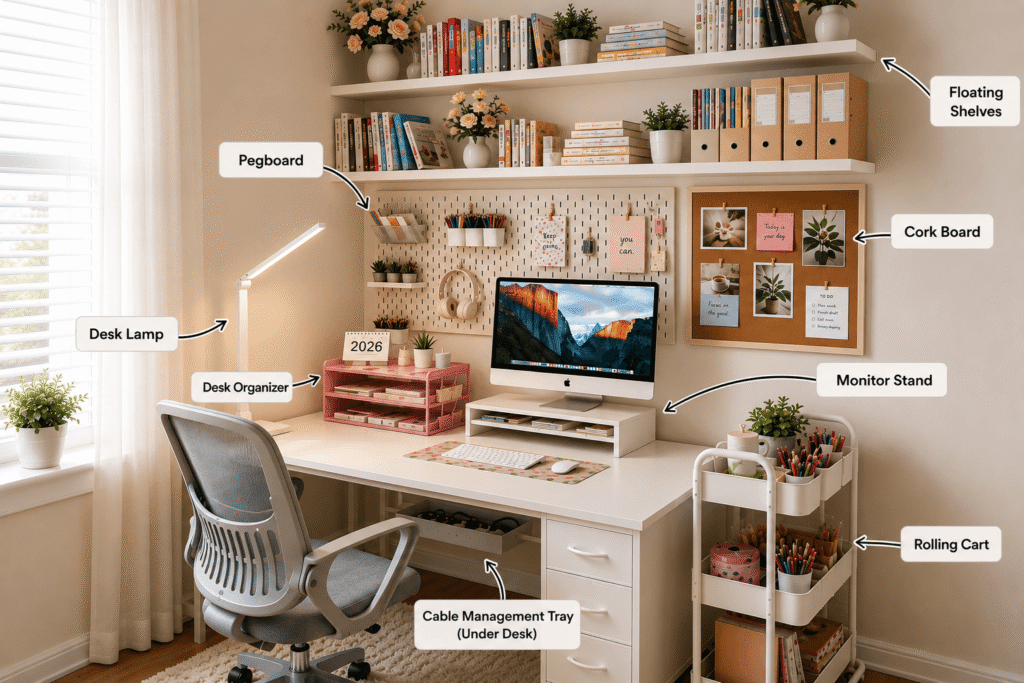
The reason this setup works is that none of these products does the same job as another. Each one solves a different problem in a different zone around the desk.
The pegboard moves small accessories onto the wall.
Floating shelves add a vertical storage zone above the desk.
The monitor standcreates a second level of storage.
Rolling cart handles overflow that doesn’t belong on the desk at all.
Desk organizer keeps everyday small items from spreading across the remaining surface.
The lamp improves lighting and charges devices without adding clutter.
The cork boardgives planning materials a fixed, visible home on the wall.
The cable tray removes the visual noise of cables and power strips from the floor and the back of the desk.
Together, they transform a desk that constantly feels overcrowded into one where almost everything has its own dedicated place.
Final Thoughts
I didn’t buy all of these products at once. I added them gradually whenever one part of my desk became frustrating enough to fix. Looking back, that’s probably why the setup works so well. Each product solved one specific problem instead of trying to solve everything.
If your desk feels cluttered, don’t assume you need a bigger desk.
Most of the time, you simply need better places for things that are currently living on it.
Start with whichever problem annoys you the most. If cables are the main source of chaos, the cable tray is the first thing to add. If the desk is disappearing under supplies and accessories, the pegboard makes the most immediate difference. If books and equipment are everywhere, add the rolling cart.
One change probably won’t create your dream workspace overnight, but one change often leads to another. And before long, your desk will start working with you instead of against you.
Frequently Asked Questions
How do I organize a small desk without drawers?
Move storage off the desk surface instead of trying to squeeze more into it. A pegboard, monitor stand and floating shelves create new storage zones without taking away valuable workspace. Between those three, most of the items that were living on the desk surface have somewhere better to go.
How can I make my desk look less cluttered?
The most effective change is giving each category of item its own dedicated zone rather than letting everything compete for the same surface. Cables hidden under the desk, supplies on a pegboard, planning materials on a cork board, and overflow on a rolling cart, when each category has a home, the desk clears itself.
What should I keep on my desk every day?
Only the things you actively use during a work or study session: your monitor or laptop, your keyboard and mouse, the lamp, and whatever you’re currently working on. Everything else belongs in one of the surrounding storage zones.
How do I organize cables on a desk?
An under-desk cable management tray is one of the most effective solutions. It takes the power strip and all associated charging cables off the floor and hides them completely beneath the desk. For cables on the surface, routing them along the back edge and through a pegboard hook keeps them from tangling across the workspace.
Are pegboards good for small desks?
Yes. Particularly for small desks, where surface space is limited. A pegboard uses wall space that’s almost always empty above a desk, which means it adds significant storage without consuming any of the desk itself.
Do I need all of these products at once?
No. Start with the product that addresses your most visible problem. Each product improves the setup independently, so you can build the full system gradually.